
Troubleshooting · Limits · Make.com

Make.com timeouts and limits: what each error means and how to fix it

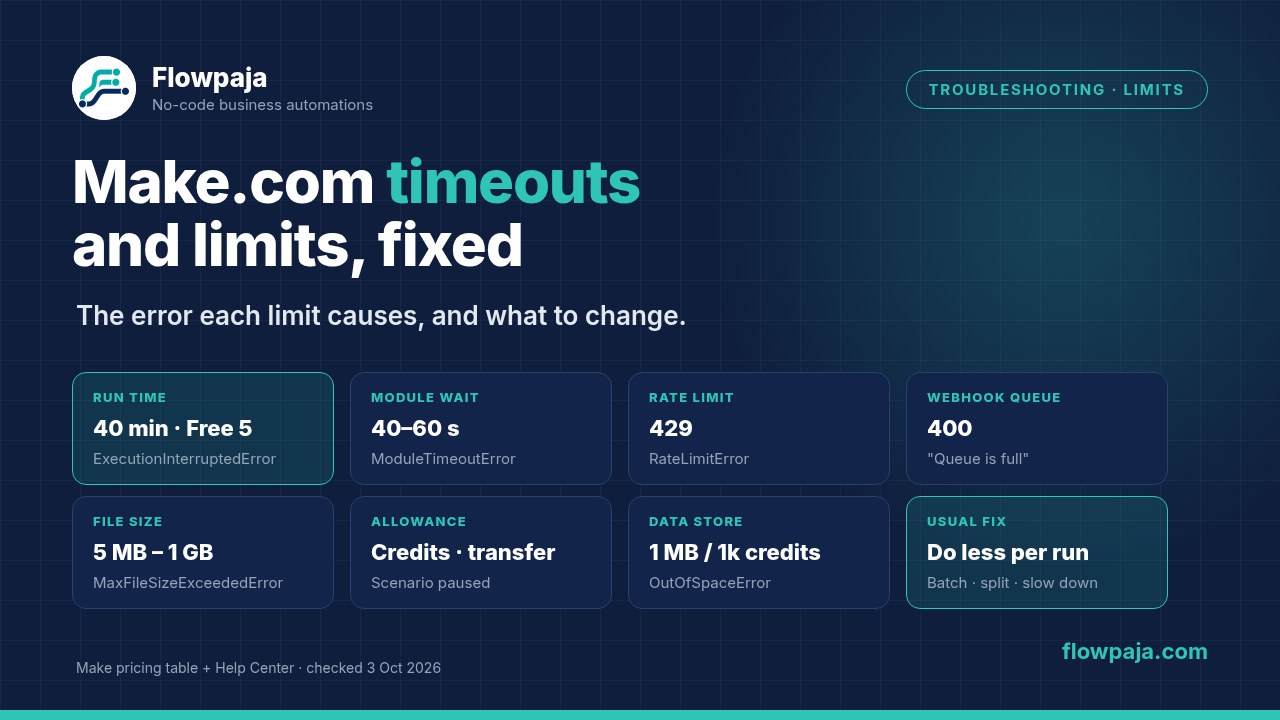
Short answer: Most "timeout" and "limit" errors in Make come from one of six limits:

  • Run time per scenario run: 40 minutes on paid plans and 5 on Free, according to Make's pricing table. A run that goes over ends with ExecutionInterruptedError.
  • Waiting time per module: most modules wait 40 or 60 seconds for an app to answer, then give a ModuleTimeoutError. In the HTTP module you can set the wait yourself, up to 300 seconds.
  • Requests per minute: the app's own API rate limit, which shows up as 429 or RateLimitError.
  • Webhook queue size: a full queue answers 400 "Queue is full".
  • File size per plan: MaxFileSizeExceededError.
  • Monthly allowance (credits and data transfer): when either runs out, Make stops scheduling the scenario.

The fix is almost always to do less per run, slow down, or split the work. Upgrading only raises the run-time, file-size and allowance limits, and none of them is a fix for a scenario that does too much in one go.

By Flowpaja · Published · Facts checked

This guide contains an affiliate link, marked “affiliate link”.

Make.com timeouts and limits: run time, module timeout, rate limit 429, webhook queue, file size and monthly allowance, with the error each one causes
Six limits, the error each one causes, and the fix.
Checked on 3 October 2026: limits come from make.com/en/pricing (as seen from a US connection), Make's Help Center pages on errors and warnings, rate limit errors, webhooks, automatic retries, subscenarios and scheduling (most updated 2 October 2026), the HTTP and Webhooks app docs on apps.make.com, and the Make API docs on developers.make.com. Where two official Make pages give different numbers, we show both. Limits change, so check the linked pages before you rely on an exact number. We earn affiliate commissions from Make.

Make limits at a glance

LimitFreePaid plansWhat you see when you hit it
Run time of one scenario run5 min (pricing table); the Help Center says 10 min40 min (pricing table); the Help Center says 45 minExecutionInterruptedError (a warning); the remaining bundles aren't processed
Module waiting for an app's responseUp to 40 seconds for most modules (some 60)ModuleTimeoutError: "The operation timed out"
HTTP module Timeout settingYou choose 1–300 secondsTimeout error in the HTTP module
Webhook response time180 seconds, then Make answers "200 Accepted"The caller gets "Accepted" instead of your Webhook response
Incoming webhook rate300 requests per 10 seconds429 "Too many requests"
Webhook queue667 items per 10,000 monthly credits, at most 10,000400 "Queue is full"; extra requests are rejected
Webhook payload5 MB, whatever your plan (mailhook emails: 25 MB)The request is rejected
File size5 MBCore 100 MB · Pro 250 MB · Teams 500 MB · Enterprise 1,000 MBMaxFileSizeExceededError
Credits per month1,000Depends on the plan you buyOperationsLimitExceededError; scheduling stops at once
Data transfer per month512 MB5 GB per 10,000 monthly creditsDataSizeLimitExceededError; scheduling stops at once
Data store storage1 MB (1 data store)1 MB per 1,000 monthly credits; each store at least 1 MB; max 1,000 storesOutOfSpaceError (a warning)
Incomplete executions storage10 MB per 10,000 monthly credits, at most 2 GBOutOfSpaceError; the scenario can be disabled
Minimum interval between scheduled runs15 min1 minYou can't set a shorter schedule
Make API requests (for the Make app or your own API calls)No Make API access listedCore 60 · Pro 120 · Teams 240 · Enterprise 1,000 per minute429 "Requests limit for organization exceeded"

Sources: make.com/en/pricing (plan table and usage allowance FAQ); Help Center: Fix errors and warnings, Webhooks; apps.make.com: HTTP, Webhooks; developers.make.com: Rate limiting. All checked 3 October 2026. The Free plan's incomplete-executions storage isn't stated separately.

About the run-time numbers: Make's pricing table lists a "maximum scenario execution time" of 40 minutes on paid plans and 5 on Free. Its Help Center page on errors (updated 2 October 2026) says ExecutionInterruptedError appears after 45 minutes, or 10 on Free. Make doesn't explain the gap, and its page on errors that don't create incomplete executions sends you to the pricing page for the limit. Plan around the lower numbers.

"Scenario execution time exceeded" (ExecutionInterruptedError)

What happened: one run of the scenario lasted longer than your plan allows. The module that was working at that moment outputs ExecutionInterruptedError. The run ends with a warning, and the bundles that hadn't been processed yet are skipped. Make keeps scheduling later runs, so the scenario stays on. The catch is that this error doesn't create an incomplete execution, so there's nothing to retry. You have to find out which items were missed yourself (Help Center: "Errors that don't create incomplete executions").

Typical causes:

  • a search that returns hundreds or thousands of rows
  • an Iterator over a big array, followed by several modules per item
  • a Sleep module inside a loop
  • a slow API that is called once per item

Fixes, in the order to try them:

  1. Process fewer items per run. Lower the Limit in the search or trigger module, and let the schedule pick up the rest on the next run. Add a status column such as "Processed" and filter on it, so each run continues where the last one stopped.
  2. Batch the calls. If the app's API accepts many records in one request, build the batch with an aggregator and send it in one HTTP call. Make's Help Center suggests this, and it saves credits too. Iterator vs Aggregator explains the pattern.
  3. Split the scenario. Hand the slow part to a second scenario with Scenarios › Call a scenario. In asynchronous mode the parent continues right away instead of waiting. Make's subscenarios docs say scenarios started through the Scenarios app don't use credits for the call itself, and the pricing table lists subscenarios on every plan, including Free. We haven't confirmed how Make counts run time when the parent waits in synchronous mode, so use asynchronous mode for the heavy part. A webhook between two scenarios also works, but every call uses credits.
  4. Remove waits. A Sleep module (at most 300 seconds) inside a loop adds up fast. Use a slower schedule instead.

Upgrading from Free raises the limit from 5 to 40 minutes (pricing table). That helps a scenario that is close to the limit, but not one that has to process more each month.

ModuleTimeoutError: "The operation timed out"

What happened: a module sent a request and the app didn't answer in time. Make's Help Center says most modules wait up to 40 seconds, and some up to 60, before giving up. The usual cause is a slow or overloaded service on the other side, or a request that asks for too much at once.

  • Turn on Store incomplete executions in the scenario settings. Make's Help Center lists ModuleTimeoutError, ConnectionError and RateLimitError as errors it retries automatically. It retries after 1 minute, then at growing intervals: 10 and 30 minutes, then 3 hours, for 8 attempts over about 8 hours.
  • Or add a Retry error handler to the module. By default it makes 3 attempts, 15 minutes apart. Make's errors page describes it as retrying "with delays of 5, 10, and 15 minutes", so check the handler's settings. If every attempt fails, the run is stored as an incomplete execution.
  • Make the request smaller: fewer records, a narrower date range, a smaller file.
  • Custom apps can have a longer timeout, up to 300 seconds for the whole app. Make's Developer Hub explains how.

Background on each handler: Make error handling: Skip, Retry, Resume, Rollback, Commit.

HTTP module timeouts and 504 Gateway Timeout

The HTTP app's Make a request module has an advanced Timeout setting in seconds, from 1 to 300 according to its docs. If an API needs a long time, for example to generate a report, raise it there. Above 300 seconds, use the API's asynchronous pattern instead: start the job, then check its status on a later run, or let the API call your webhook when it's done.

A 504 Gateway Timeout comes from the server you called, not from Make. A proxy in front of the API gave up waiting. Retry it later and make the request smaller.

Webhook responses: when another system calls your Make webhook and waits for an answer, Make waits up to 180 seconds for your Webhook response module (Webhooks app docs, updated 4 August 2026). After that, the caller gets "200 Accepted" instead. If the work takes longer, send the Webhook response first and do the slow part after it.

To have 4xx and 5xx responses treated as errors, so a Retry handler can catch them, set Return error if HTTP request fails to Yes in the HTTP module.

Rate limits: 429 and RateLimitError

What happened: your scenario sent more requests than the app allows in a period, such as 100 a minute. The app answers HTTP 429, and Make shows it as RateLimitError. The limit belongs to the app (Google Sheets, Airtable, OpenAI and so on), not to Make. What Make does next depends on your settings (Help Center: "Fix rate limit errors"):

Scenario typeIncomplete executions offIncomplete executions on
ScheduledNext run paused for 20 minutes; the failed data isn't rerunNext run paused for 20 minutes; the incomplete execution is retried with growing delays
Instant (webhook)Rerun from the start with growing delaysIncomplete execution retried with growing delays

Fixes:

  • Instant scenarios: set Maximum runs to start per minute in the schedule settings of the instant trigger. The default is 100. Extra requests wait in the queue and run as capacity frees up. If the scenario ends with a Webhook response, callers over the limit get a 429 and should retry.
  • Scheduled scenarios: process fewer records per run, less often. For runs every minute, Make recommends at most about 20 records per run.
  • Sleep: a Sleep module before the busy module spaces out calls (up to 300 seconds). For 10 requests a minute, sleep 6 seconds. Make warns that this often delays the problem rather than solving it, and it adds run time (see above).
  • Process data in order (scenario settings) makes webhook runs go one at a time instead of in parallel. It's slower, but gentler on APIs.
  • Batch requests where the API supports them, so one call carries many records.

Two limits that are Make's own:

  • Incoming webhooks: Make accepts up to 300 requests per 10 seconds and answers 429 above that.
  • The Make API (also used by the Make app): 60 requests a minute on Core, 120 on Pro, 240 on Teams and 1,000 on Enterprise. Above that, it answers 429 "Requests limit for organization exceeded" (developers.make.com).

App-specific 429 messages, for example Google's "Quota exceeded" and Slack's "ratelimited", are in the Make error cheat sheet.

Webhook queue full: 400 "Queue is full"

Every webhook has its own queue. Requests wait there when the scenario is off, busy, scheduled, or held back by a rate limit or Process data in order. The queue holds 667 items for every 10,000 credits in your monthly plan, at most 10,000. When it's full, Make rejects new requests with HTTP 400 "Queue is full", and that data is lost unless the sender retries.

  • Switch the scenario on and fix the error that stopped it, so the queue drains.
  • Scheduled webhooks process only the Maximum number of results per run, which is 2 by default. An hourly schedule with the default handles 2 requests an hour. Raise the setting, or switch to "Immediately".
  • Delete stale items under Webhooks › your webhook › Queue.

Step-by-step checks when data doesn't arrive at all: Make webhook not receiving data.

"Max file size exceeded" (MaxFileSizeExceededError)

A module tried to handle a file bigger than your plan allows: 5 MB on Free, 100 MB on Core, 250 MB on Pro, 500 MB on Teams and 1,000 MB on Enterprise (pricing table). Make's own example is moving a file over 100 MB with Google Drive on Core. Without an error handler, the run ends with an error and counts toward the scenario being switched off.

  • Don't move the file through Make at all. Pass a link or file ID. For example, ask the app to copy or share the file itself, rather than downloading and uploading it.
  • Make it smaller: compress or split it with a PDF or file app before the step that fails.
  • Skip oversized files on purpose: filter on the file size before the upload, and log or email the ones you skipped.
  • Upgrade if large files are normal for you. Upgrading is the only way to raise this limit.

Webhook payloads have their own fixed 5 MB limit on every plan, so send a file URL rather than the file itself. Related builds: Gmail attachments to Google Drive and PDF automation in Make.

"Scenario is paused (because of exceeded limits)"

This message means the organization has used up a monthly allowance. Make's Help Center describes two fatal errors that switch scheduling off immediately, without waiting for several errors in a row:

  • OperationsLimitExceededError: the organization is out of credits. The name dates from when credits were called operations.
  • DataSizeLimitExceededError: the monthly data transfer is used up. That's 512 MB on Free and 5 GB per 10,000 credits on paid plans. In Make Community threads, users report Free scenarios paused by data transfer while credits were still left. This is the first thing to check when the credit counter isn't at zero.

Fix:

  1. Open your organization's subscription or usage page to see which allowance ran out.
  2. Find what used it. Look in each scenario's History for frequent polling, loops, or a webhook that fires more often than expected.
  3. Buy extra credits, upgrade, or wait for the monthly reset.
  4. Then open each scenario and check that it's switched on again.

Make sends usage alerts at 75% and 90% of your credits (pricing FAQ). Make credits explained shows where credits usually go and has 12 ways to use fewer. The credits calculator estimates a month before you switch a scenario on.

If it isn't the allowance, work through why a Make scenario stopped or was disabled.

Data store full and OutOfSpaceError

Data stores share a storage allowance of 1 MB per 1,000 monthly credits. The Free plan's 1,000 credits give 1 MB, enough for one data store. Each store takes at least 1 MB, and an organization can have up to 1,000 stores (pricing FAQ). When a store or the allowance is full, Data store modules output OutOfSpaceError. The run ends with a warning, the remaining bundles are skipped, and the scenario stays on.

  • Delete old records, or give the store more of your allowance: edit the data store and change its size in MB.
  • Add a Resume error handler that writes to a backup data store, as Make's Help Center suggests.
  • For bigger datasets, keep the data in Google Sheets, Airtable or a database, and keep only keys in the data store.

Incomplete executions storage (10 MB per 10,000 credits, at most 2 GB) can fill up too. If it’s full and Discard data if storage is full (scenario settings) is off, Make switches the scenario off. If it’s on, the failed data is discarded for good. Resolve or delete old incomplete executions regularly.

"Exceeded maximum wait time" when testing a webhook

Make's Help Center doesn't list this exact message. In Make Community threads, it appears when you click Run once on a scenario whose trigger waits for data, such as a webhook, Facebook Lead Ads or another instant trigger, and nothing arrives within about a minute. It isn't a problem with your scenario. Click Run once, then send the test data straight away. Or switch the scenario on and let real data trigger it.

Do you need to upgrade?

Only for limits that are tied to the plan. Plan comparison from Make's pricing table, checked 3 October 2026:

LimitFreeCore and upDoes upgrading fix it?
Run time5 min40 minYes, if you're just over 5 minutes. A scenario that needs more than 40 has to be split anyway
File size5 MB100–1,000 MB by planYes
Credits and data transfer1,000 credits, 512 MBScale with the credits you buyYes, or buy extra credits
Active scenarios2UnlimitedYes
Scheduling interval15 min1 minYes
Execution log storage7 days30 days (60 on Enterprise)Yes
Module timeout, app rate limits, webhook rate and payloadSame on every planNo. Do less per run, slow down or batch

Features that aren't on Free and sometimes come up in fixes:

  • The Make Code app for JavaScript or Python, which uses 2 credits per second of run time on paid plans
  • Custom variables, from Pro
  • Custom functions, Enterprise only

Everything else this guide recommends is on every plan, including Free: smaller limits, aggregators, subscenarios, Retry handlers, Store incomplete executions, and Sleep.

If you're testing these fixes away from a client's account and don't have Make yet, create a free Make account (affiliate link). The Free plan's 5-minute run time and 5 MB file limit make limit problems easy to reproduce.

Affiliate disclosure: the link marked "affiliate link" includes our partner code. If you sign up or later buy a paid plan through it, Flowpaja may earn a commission at no extra cost to you. More on the tools we use: best tools for Make automation.

Stop limits from breaking a scenario again

  • Store incomplete executions on every scenario that matters, so timeouts and rate limits are retried instead of lost. Watch the storage.
  • Cap every search and trigger with a Limit, and track progress in a status column.
  • Add error routes to the modules that call slow or busy APIs: Retry for timeouts and 429s, plus an alert to Slack or email.
  • Check History after the first busy day: run time, credits per run and the number of bundles show which limit you're closest to.
  • Keep the list of error names handy: the Make error cheat sheet (free PDF) covers every error type and HTTP code. Fix common Make scenario errors covers mapping and connection problems.

Sources checked (3 October 2026)

  • make.com/en/pricing: plan table (maximum scenario execution time, file size, data transfer, active scenarios, interval, log storage, Make API rate, Make Code App, custom variables, custom functions, subscenarios) and FAQ (usage allowance, data stores, credit alerts), as seen from a US connection
  • Make Help Center: Fix errors and warnings (updated 2 Oct 2026); Fix rate limit errors (2 Oct 2026); Webhooks (2 Oct 2026); Automatic retry of incomplete executions (2 Oct 2026); Incomplete executions (2 Oct 2026); Subscenarios (2 Oct 2026); Errors that don't create incomplete executions (3 Sep 2026); Scenario settings (8 Sep 2026); Schedule a scenario (30 Jun 2026)
  • apps.make.com: HTTP (Timeout 1–300 seconds; updated 2 Oct 2026); Webhooks (5 MB payload, 25 MB mailhook, 180-second response timeout; updated 4 Aug 2026)
  • developers.make.com: Make API rate limiting
  • Make Community threads on "Scenario is paused (because of exceeded limits)" and "Exceeded maximum wait time" (user reports, not Make documentation)

FAQ

What is the maximum execution time of a Make scenario?
Make's pricing table lists a maximum scenario execution time of 40 minutes on paid plans and 5 minutes on the Free plan (checked 3 October 2026). Make's Help Center page on errors says the ExecutionInterruptedError appears after 45 minutes, or 10 minutes on Free. Plan around the lower numbers, and split long scenarios.
How do I fix "scenario execution time exceeded" in Make?
Process fewer items per run by lowering the Limit in your search or trigger and tracking progress in a status column. Batch API calls with an aggregator and one HTTP request, or move the slow part to a second scenario with Scenarios > Call a scenario in asynchronous mode. The interrupted run doesn't create an incomplete execution, so check which items were missed.
Can I increase the timeout of a Make module?
Not for standard app modules: Make's Help Center says most wait up to 40 seconds, some 60, before a ModuleTimeoutError. The HTTP module's Make a request has a Timeout setting from 1 to 300 seconds. Custom apps can set a longer timeout, as described in Make's Developer Hub. For slow APIs, start the job and check its result in a later run.
What does a 429 error mean in Make?
HTTP 429 means too many requests: the app's API rate limit was exceeded, and Make shows it as a RateLimitError. Without an error handler, a scheduled scenario's next run is paused for 20 minutes. Fix it by processing fewer records per run, setting Maximum runs to start per minute on instant triggers, adding a Sleep module or batching requests.
Why does my Make webhook return "Queue is full"?
Each webhook queue holds 667 items per 10,000 monthly credits, at most 10,000. When it's full, Make rejects new requests with HTTP 400 "Queue is full". Switch the scenario on and fix its errors so the queue drains, and for scheduled webhooks raise Maximum number of results, which is 2 per run by default.
What is the file size limit in Make?
As of 3 October 2026, Make's pricing table lists 5 MB on Free, 100 MB on Core, 250 MB on Pro, 500 MB on Teams and 1,000 MB on Enterprise. Larger files cause a MaxFileSizeExceededError. Webhook payloads are limited to 5 MB on every plan, so pass a file link instead of the file.
Why is my scenario paused because of exceeded limits when I still have credits?
Check the data transfer allowance as well as credits. Make's Free plan includes 512 MB of data transfer a month, and paid plans 5 GB per 10,000 credits. Running out triggers a DataSizeLimitExceededError, which stops scheduling immediately, just like running out of credits does.

Scenario still timing out or hitting limits? Send us the blueprint

Export the scenario blueprint, add a screenshot of the error and the History, and we'll find what's eating the run time, the requests or the credits. We'll restructure it with limits, batching or a subscenario. It's fully async: no logins and no calls.

Building from scratch instead? Our Make templates keep each run small, with search limits and status columns. Four are free.

← All guides · All templates

Make, Google, Google Drive, Gmail, Slack, Airtable, OpenAI and Facebook are trademarks of their owners. Flowpaja is independent and not affiliated with or endorsed by them. Limits, plans and prices change; check Make's current pricing page and Help Center.